Quarkdown is an open source typesetting system built on top of Markdown. With a single source file, you can produce academic papers, presentations, static websites, and knowledge bases. It extends Markdown syntax with programmable functions while staying easy to read and quick to pick up.
If you already write in Markdown but find it too limited for producing polished, LaTeX-style documents, Quarkdown is worth a look.
What is Quarkdown?
Markdown is pleasant to write, but it falls short when you need a finished, elegant document. That’s where tools like LaTeX come in, offering much finer control over layout. The trade-off is a steep learning curve that puts many people off.
Quarkdown sits between the two. It’s built on CommonMark and GFM (GitHub Flavored Markdown), so anyone who already knows Markdown can pick it up quickly. On top of that familiar base, it adds a Turing-complete function language that lets you build:
- custom layouts
- loops
- conditionals
- reusable components
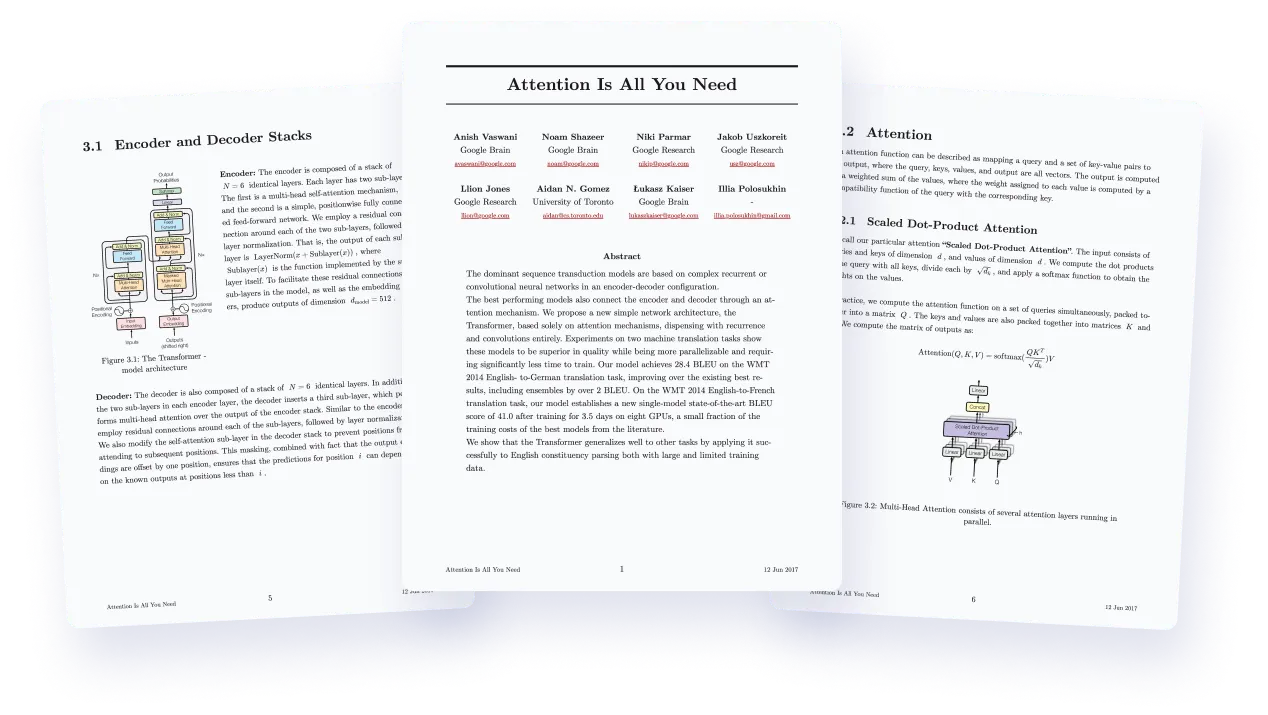
A single Quarkdown project can compile to several output formats: a scientific paper, an interactive presentation, a book, or a static website.
Quarkdown is aimed at:
- researchers and students writing academic documents with figures, equations, and bibliographies
- instructors preparing course materials and interactive presentations
- teams maintaining technical documentation or an internal knowledge base
- content creators who want to publish a static site or a book from a single source
Key features
Quarkdown’s syntax introduces function calls that start with a dot and use curly braces for arguments — for instance, to align a block of text or generate an automatic table of contents. You can also define your own reusable functions, similar to macros, so you don’t have to repeat the same layout block throughout a document.
For example, you can define a greet function that takes one positional parameter and one named parameter, then call it twice with different values:
For example, you can define a greet function that takes one positional parameter and one named parameter, then call it twice with different values:
.function {greet}
    to from:
    **Hello, .to** from .from!
.greet {the world} from:{Quarkdown}
.greet {readers} from:{this blog}
This renders “Hello, the world from Quarkdown!”, followed by “Hello, readers from this blog!”. Once the function is defined, a single call reuses the entire formatting logic instead of copying the same block over and over.
Quarkdown offers several composition modes depending on what you’re building:
- a continuous mode (“plain”), similar to Notion or Obsidian, suited to websites and knowledge bases
- a paginated mode (“paged”), designed for PDFs with traditional page breaks
- a slideshow mode for interactive presentations
The tool provides live preview in the browser as you write. According to the project’s documentation, a wiki with more than 100 pages can compile in about 2 seconds, which makes iteration nearly instant.
For long documents such as academic papers, Quarkdown natively handles numbering for sections, figures, tables, and equations. It also generates a table of contents automatically and inserts footnotes.
Several color themes (paperwhite, darko, galactic, beaver) and layout themes (latex, hyperlegible, minimal, beamer) are available. You can mix and match them to change a document’s appearance without touching its content.
Because the language executes code inside the document, Quarkdown’s creators built in a restrictive permission system that limits access to system resources by default.
Finally, Quarkdown ships with an official VS Code extension offering syntax highlighting and integrated preview. The project also provides a “skill” designed to help AI agents generate idiomatic Quarkdown code.
Getting started with Quarkdown
Installation takes a single command line, depending on your system.
On macOS and Linux with curl:
curl -fsSL https://raw.githubusercontent.com/quarkdown-labs/get-quarkdown/refs/heads/main/install.sh | sudo env "PATH=$PATH" bash
or with Homebrew on macOS:
brew install quarkdown-labs/quarkdown/quarkdown
On Windows, via a PowerShell script or the Scoop package manager:
irm https://raw.githubusercontent.com/quarkdown-labs/get-quarkdown/refs/heads/main/install.ps1 | iex
scoop bucket add quarkdown https://github.com/quarkdown-labs/scoop-quarkdown; scoop install quarkdown
Once installed, the command:
quarkdown create
generates a new project with a starter .qd file.
Compiling a document to HTML takes one command:
quarkdown c
You can add the -p (preview) and -w (watch for changes) options to enable live preview. PDF export is also available through a dedicated option.
If you’d rather just try out the syntax without setting up a full project, an interactive REPL mode is also available.
Quarkdown vs. LaTeX vs. Typst vs. Markdown
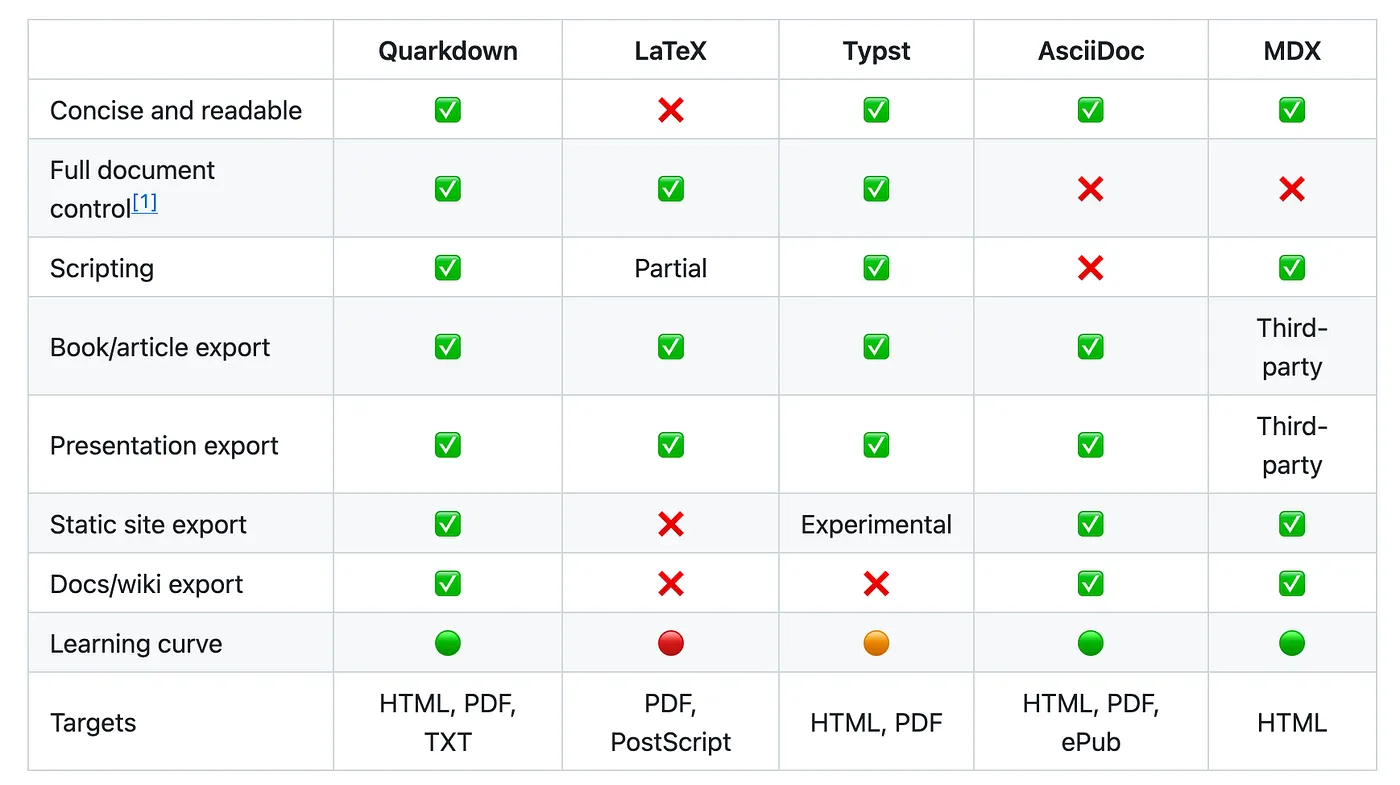
Plain Markdown offers no advanced layout, no conditional logic, and no clean PDF export without relying on third-party tools. Quarkdown fills that gap while keeping a familiar syntax.
LaTeX remains the reference for fine-grained typographic control, but its syntax is verbose and its learning curve steep. Quarkdown aims for comparable output quality with a much lighter syntax.
Typst is another modern LaTeX competitor, with its own composition language. Quarkdown sets itself apart by building directly on existing Markdown syntax, which shortens the learning curve for anyone already familiar with that ecosystem, rather than introducing an entirely new language.
License
The project is distributed under the GNU GPLv3 license for the core language, with the CLI and language server modules under AGPLv3.
[!IMPORTANT] This article was originally published on Medium.